IntRec – Pack Intelligence and Reconnaissance Package/Bundle installer

Welcome to Hacking a rise in this i am going to show you how to install and use IntRec on any Debian system i am using Kali Linux for this tutorial Whats IntRec IntRec-Pack is a Bash script designed to download, install and deploy several quality OSINT, Recon and Threat Intelligence tools. Due to the …

How to use raccoon-scanner

Introduction Hello and welcome to another post and in this one we will be going over raccoon-scanner. This is a high performance offensive security tool that is made for recon and vuln scanning, as they explain it. We’ll be going over how to install it and use it + an overview of my experience with …

Get a location with an IP adress

Get a Location using an IP adress   Hey guys ! Lasr here 🙂 Today I’m gonna show you how to get the approximate location of an IP with iplocation.net. For this tutorial, you will need : A computer/smartphone/tablet with any OS on it, an internet connection and a photo editing software. SPOILER : you …

Nmap Basic’s part one Simple scan

Welcome back to hacking arise lads Laughing Man here with a very basic understanding of some the commands in Nmap Free Security Scanner What is Nmap network scanner Nmap is a free and open-source network scanner created by Gordon Lyon. Nmap is used to discover hosts and services on a computer network by sending packets …

how to find the owner of a number with phoneinfoga

welcome to Hacking a rise in this post we are going to search for a phone number as sometimes we only have a number two go on the tool we are going to use is called Phone infoga this will search the internet for the owner of the phone number you provide this tool can …

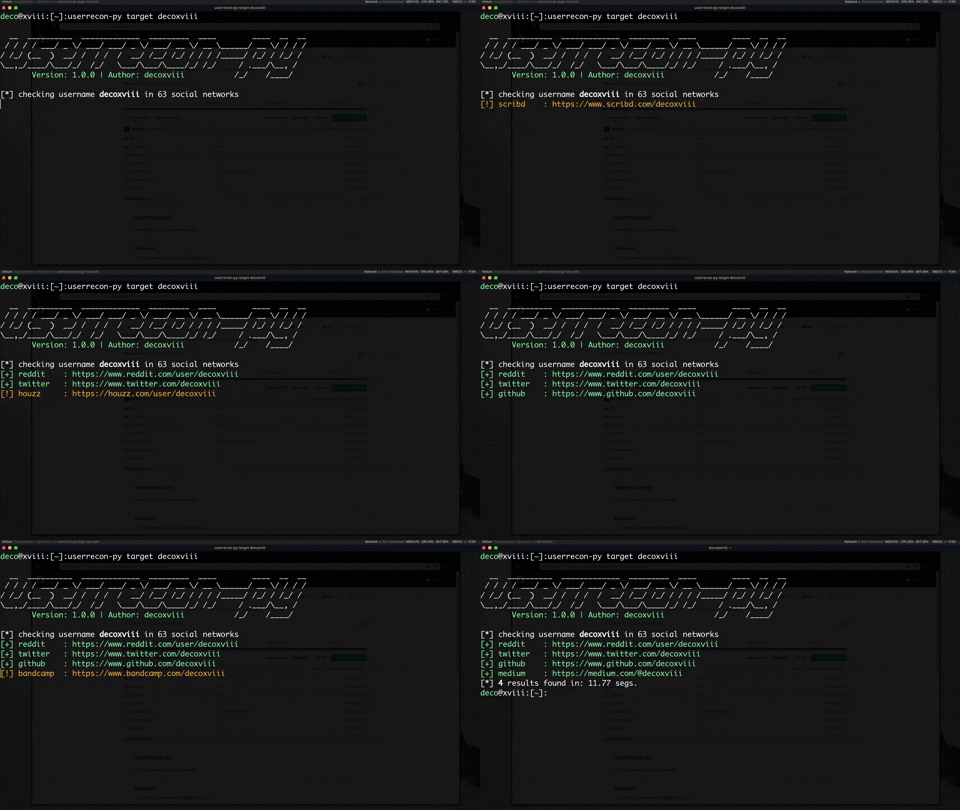
Userrecon-Py – Find Usernames In Social Networks

  Find usernames in social networks Installation 1. Install dependencies(Debian/Ubuntu): sudo apt install python3 python3-pip 2. Install with pip3: sudo -H pip3 install git+https://github.com/decoxviii/userrecon-py.git userrecon-py –help Building from Source Clone this repository, and: git clone https://github.com/decoxviii/userrecon-py.git ; cd userrecon-py sudo -H pip3 install -r requirements.txt python3 setup.py build sudo python3 setup.py install Update To update this …

Design a site like this with WordPress.com
Get started